
“Nine in the evening, and another ‘what’s for lunch tomorrow?’ message.”
Meals Websites for preschools and nurseries
Parents ask, your site answers.
The meal menu, announcements and pre-registration form live on your site, so parents check their phone instead of asking you.
KidoPad opens very soon.
- No card needed
- Free plan never expires
- Pro is on for your first 14 days
The site in the frames is drawn with KidoPad’s real themes; photos and texts are samples, shown here in English. School sites are published in Turkish today. During setup you add your own photos, teachers and texts.
Sound familiar?
Running a school, and dealing with this too.
“An agency built our site years ago. Who has the password?”
Website“Someone called about pre-registration. I wrote it down. Where’s that note?”
Pre-registration“I messaged every parent the bus time. Someone still asked.”
Announcements“Google still shows our old phone number.”
Website“Which parents did I send the trip photos to, and which did I miss?”
Photos“A parent asked about fees on Instagram and I forgot to reply.”
Pre-registration
“I photograph the menu and post it to the group. Nobody can read it.”
Meals“I announced the holiday in three separate groups.”
Announcements“A parent who wanted to visit couldn’t find our address on the site.”
Website“The teacher list on our site is two years old.”
Website“Enrolment season: the phone never stops, and it’s always the same questions.”
Pre-registration“Every day I tell someone which age groups still have places.”
Pre-registration“Every time, I worry a child’s photo gets shared without permission.”
Photos
Each one looks small. Together they take hours out of your week, and some applications never get a reply.
A parent’s week
The same questions arrive every week. When the answers are on your site, parents look them up on their phone. Screens are from a sample school site.
- Mon 07:40
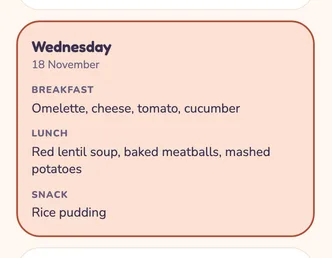
“What’s for lunch today?”
Meal menu
You enter the menu once. Each day the site shows that day’s meals.
- Tue 12:15
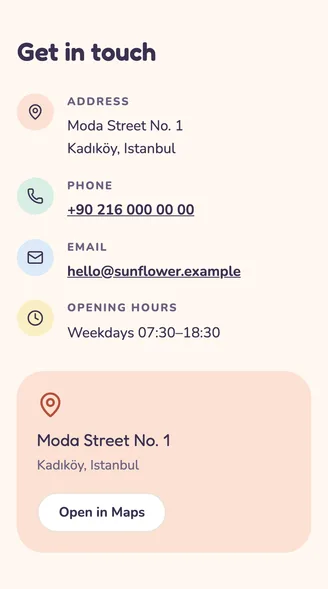
“What time is pick-up?”
Hours and contact
Opening hours, phone and address are on the site; parents check without asking.
- Wed 21:30
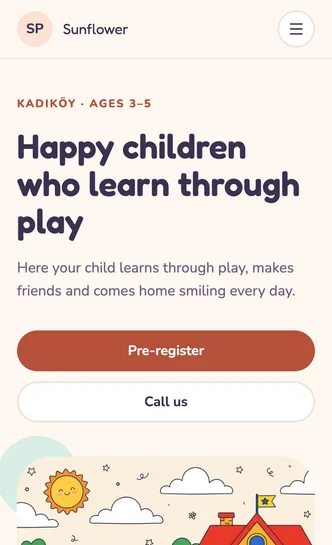
“I’d like to pre-register.”
Pre-registration form
A parent fills in the form at night; the application waits in your panel in the morning.
- Fri 16:05
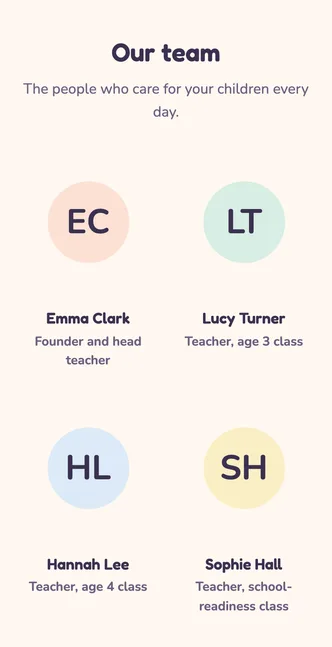
“Who will the teacher be?”
Teachers
Introduce your team with a photo or initials; update it from your phone.
Panel
School jobs, in school words
The panel only has the screens a school needs, and all of them work on a phone. The panel is available in English and Turkish; the screens below use sample data.
1 / 4 Pre-registration
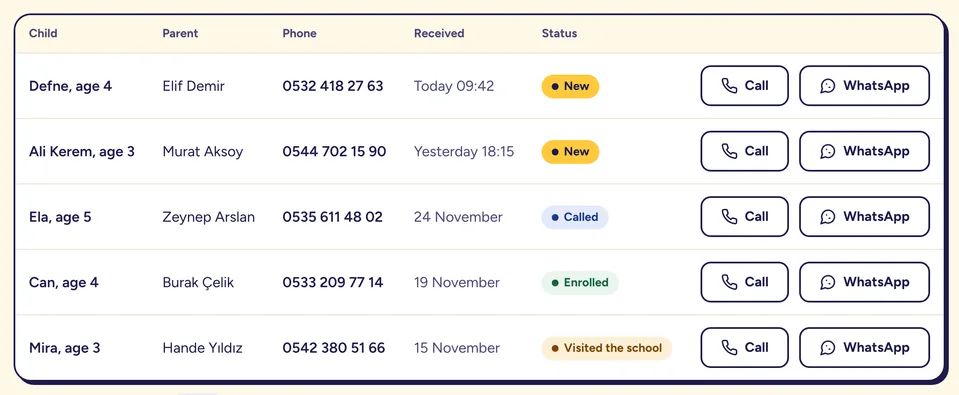
Applications in one list, with phone numbers
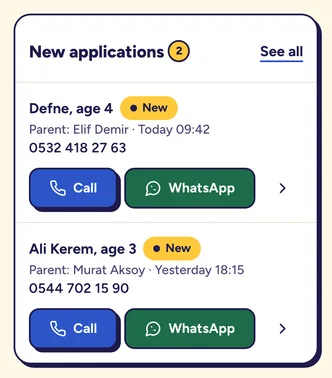
Parents can fill in the form on your site at night. In the morning the application waits in your panel as “New”, and you get an email too.
- Call the parent or message them on WhatsApp with one tap.
- Give every application a status:
- New
- Called
- Visited the school
- Enrolled
- Withdrew
- On Pro, export the list to Excel.
2 / 4 Announcements and albums
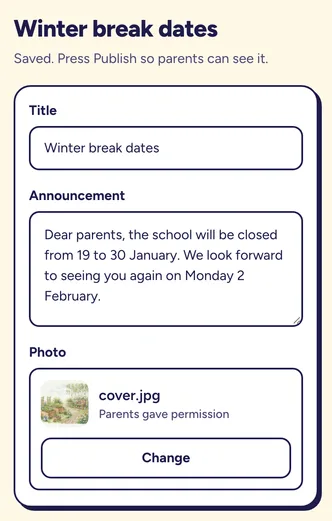
Write the trip announcement on the bus home
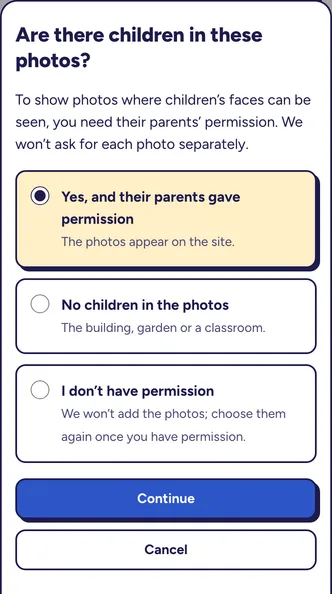
Announcements and photo albums are added from your phone. If the photos show children, the panel first asks whether you have the parents’ permission.
- Without permission, the photos are not added to the site.
- Until you press Publish, parents see the previous version of the site.
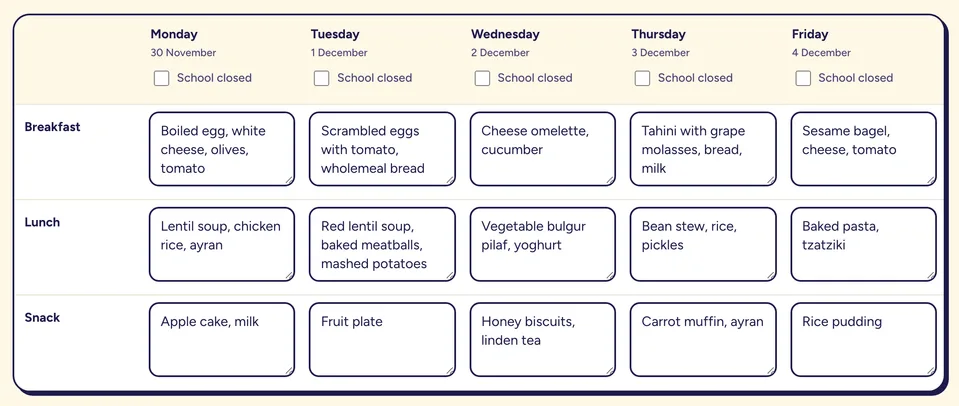
3 / 4 Meal menu
Enter the month’s menu once
Day by day, three meals. Each day the site shows that day’s menu. You can also upload a photo or PDF of the menu.
- “Copy last week” saves you retyping a repeating menu.
- Mark a day the school is closed with one tick.
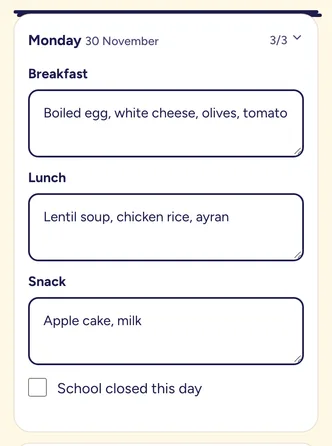
On the site todayLentil soup, chicken rice, ayran
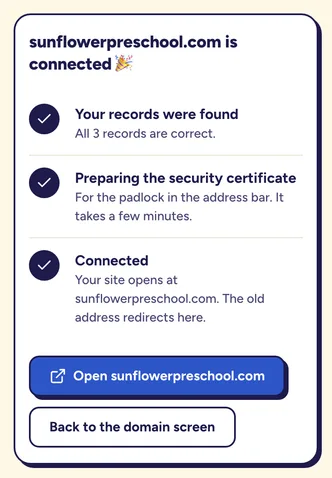
4 / 4 Your own address PRO
Parents find you at your own domain
You go live straight away at yourschool.kidopad.com. On Pro you connect your own domain step by step; the panel checks the settings itself.
- The security certificate (the padlock in the address bar) is set up automatically.
- Your old kidopad.com address redirects to the new one.
- A free .com.tr domain with yearly Pro planned
Live in three steps
No technical knowledge needed. The questions are plain, and you see your site at every step.
- A few questions
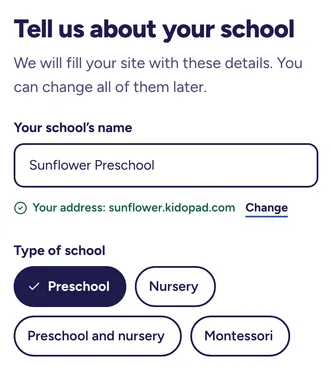
Step 1: Tell us about your school
Name, type, age groups and phone number. Your site fills in from these answers.
- Two choices
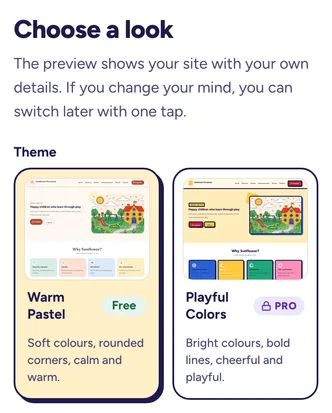
Step 2: Pick a look
One theme, one colour. You see your site with your own details as you choose.
- One tap
Step 3: Publish
Press “Publish my site”. Your address is ready: yourschool.kidopad.com.
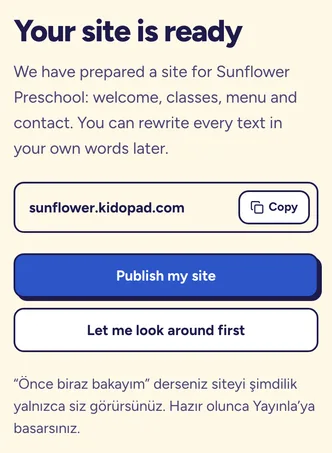
That’s it. Add your logo, cover photo and texts later, from your phone.
Tell me when it opens- No card needed
- Pro is on for your first 14 days
Which schools is it for?
KidoPad is made for early years settings. You pick your school type during setup, and age groups and sample texts follow from it.
Preschool
Ages 3–6Pre-registration, classes and the daily schedule in front of parents.
- Pre-registration form and applications list
- Classes by age group
- Daily schedule and meal menu
Nursery
Ages 0–3Nap and feeding times, meal menu, photo permission.
- Naps and feeding in the daily schedule
- Weekly meal menu
- Permission question for children’s photos
Montessori school
Ages 2.5–6Pages that explain your approach and your prepared classrooms.
- A page about your approach
- Albums for classroom photos
- Pre-registration for parents who want to visit
Page coming soon
Day-care centre
Mixed agesOpening hours, bus information and the daily menu in one place.
- Opening and closing times
- Each day’s menu
- Holiday and trip news as announcements
Page coming soon
Study and play groups
School ageProgramme, hours and a registration form; what parents ask is on the site.
- Weekly programme and hours
- Registration form and applications list
- Teacher introductions
Page coming soon
Schools with branches
Several addressesA separate site for each branch, all from one account.
- A separate site and address per branch
- Switch branch at the top of the panel
- Priced per school
Page coming soon
Use cases by school type and task
Hover over a card or tap “What’s ready?” to see what comes ready for that school type.
Compare the other ways
Every option has its place. For an early years setting, this is how they differ.
| Topic | Site built by an agency | Do it yourself with a template | Social media only | KidoPad |
|---|---|---|---|---|
| Getting started | ||||
| Free to start | Design fee | Template and hosting fees | Free plan, no time limit | |
| No technical knowledge needed | Agency sets it up | Setup is on you | A few questions, one tap | |
| Every day | ||||
| You update the site yourself, from your phone | Every change goes to the agency | General-purpose panel | ||
| Meal menu and daily schedule ready | Built at extra cost | You build it | Lost in the feed | Each day’s menu |
| Applications in one list | Form lands in email | Needs a plugin | In the inbox | With Call and WhatsApp buttons |
| Children and parents | ||||
| Parent permission asked for children’s photos | Up to you | Up to you | Up to you | In every album |
| Design | ||||
| Fully custom design | Depends on the template | Ready themes; colour, logo, section choice | ||

If you want a fully custom design, an agency may suit you better. KidoPad is for schools that want to update their own site, often.
Start free, move to Pro when you grow.
On the Free plan your site stays live with no time limit. Pro adds your own domain, every theme and more photo space.
Free
₺0
No time limit, no card needed
- yourschool.kidopad.com address
- Warm Pastel theme, Peach colour
- Pre-registration form and applications list
- Meal menu, daily schedule, teachers
- 10 announcements, 2 albums, 40 photos
- A small KidoPad strip at the bottom of the site
Setup is a few questions and one tap.
Pro
₺999 / month
₺11,990 billed yearly, 2 months free
₺1,199 / month
Billed monthly, cancel any time
- Your own domain
- Free .com.tr domain planned
- All themes and colours
- Hide and reorder sections
- No KidoPad strip
- Blog and Google settings
- Unlimited announcements and albums, 2,000 photos
- Export applications to Excel
KidoPad opens very soon. At launch you can try Pro for 14 days without a card; online payment comes later.
Prices are in Turkish lira, VAT included, per school.
Compare Free and Pro line by lineWhat parents trust you with stays with you.
A school site carries information about children. We built KidoPad with that in mind.
Applications belong to your school
Names, phone numbers and notes from the pre-registration form belong to your school and stay in your panel. KidoPad processes them on your school’s behalf, to run your site and panel.
A permission question for children’s photos
When you add an album, the panel asks whether you have the parents’ permission. Without it, the photos are not added to the site.
Servers in Germany, backups in the EU
Your site and panel run on servers in Germany (EU); backups are kept in Finland (EU). The connection is always encrypted (https), and site traffic passes through Cloudflare.
Made for parents’ phones
The site is designed for phone screens first. The menu, announcements and pre-registration form read easily on a small screen.

Payments will be taken by iyzico, a licensed payment institution; your card details are not stored by KidoPad. KidoPad is a Kodbrew product.
Questions
Can’t find your answer? Write to [email protected].
I have no technical knowledge. Can I set up the site myself?
Yes. During setup you enter your school’s name, type and phone number and pick a look. The site is built from that. Everything in the panel is written in plain language.
I already have a domain. Can I use it?
Yes, on the Pro plan. The panel shows you, step by step, which records to enter at your domain provider and checks them itself. If you get stuck, write to [email protected].
Can parents read the school site in English?
Not yet. School sites are published in Turkish today; the panel is available in English and Turkish.
Is it right to show children’s photos on the site?
Only with the parent’s permission. That is why the panel asks, for every album, whether the photos show children and whether you have the parents’ permission. If you don’t, the photos are not added to the site.
Is the Free plan really free?
Yes. There is no time limit and we don’t ask for a card. Your site stays live at yourschool.kidopad.com with a small KidoPad strip at the bottom.
How does the 14-day Pro trial work?
A newly created school gets Pro features for its first 14 days. No card is needed and nothing is charged when the trial ends. We remind you before it ends; a 7-day grace period follows, then you switch to the Free plan with one tap.
Where is the data kept?
KidoPad runs on Kodbrew’s servers in Germany (EU); backups are kept in Finland (EU). Site traffic passes through Cloudflare and the connection is always encrypted. Pre-registration applications belong to your school; KidoPad processes them on your school’s behalf.
Are prices in Turkish lira and VAT included?
Yes. Prices are in Turkish lira (TRY), VAT included, per school.
Free tool (in Turkish)
Make your weekly meal menu and print it on A4.
With your school’s name and logo, ready for the noticeboard. No sign-up; it runs in your browser.
- Pick from common dishes
- Copy the previous day
- Print or save as PDF
Be the first to hear when KidoPad opens.
Setup takes a few questions. When you finish, your site opens at yourschool.kidopad.com.
KidoPad opens very soon.
- No card needed
- Free plan never expires
- Pro is on for your first 14 days